


Replace ClickUp, Trello & Spreadsheets With One System
One-time purchase. Zero chaos. Entire team organized.
- See every client, project, task, and deadline from one dashboard
- Stop chasing your team for updates - know exactly what’s done and what’s stuck
- Deliver projects faster with clear workflows and built-in accountability
- Never miss a deadline because of poor communication or scattered systems
- Replace $50–$200/month in software subscriptions with a one-time purchase
- Replace ClickUp, Trello, Notion, and messy spreadsheets with one system
- Save hours every week on project management and admin work
- Never miss a deadline because of poor communication or scattered systems
- Finally know who is working on what - Isaac S.
- Set up in one 30 min, used it daily — Brian H.
- My team stopped missing deadlines - Key R.
- Best buy I made for my agency - Erin D.
- Dashboard shows me everything in seconds - Narjes M.
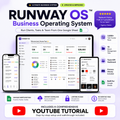
Instant digital download. No subscriptions.


My team know exactly what to work on without me telling them every morning. Game changer.
Item Type:
Team Management Spreadsheet - OS
I run a 4-person video team. This is the only system where everything stays connected automatically
Item Type:
Team Management Spreadsheet - OS

Set it up on a Sunday, had my whole team running from it by Monday. Zero learning curve.
Item Type:
Team Management Spreadsheet - OS

Assigned tasks to my editors, checked the dashboard 4 hours later, everything was moving
Item Type:
Team Management Spreadsheet - OS

Best $97 I have spent on my business this year. Not even close.
Item Type:
Team Management Spreadsheet - OS
My team always know what's assigned, what's due, and what comes next. No confusion anymore
Item Type:
Team Management Spreadsheet - OS

Three clients, two editors, one sheet. Finally feels manageable.
Item Type:
Team Management Spreadsheet - OS
I was running my agency from memory. This replaced that completely in week one.
Item Type:
Team Management Spreadsheet - OS

Opened it on a Friday, fully set up for my team by Monday. Clean and straightforward.
Item Type:
Team Management Spreadsheet - OS
My clients don't see this but they feel it. Deadlines are hit, delivery is tighter.
Item Type:
Team Management Spreadsheet - OS

Setup took 40 minutes. The time I've saved since is not even measurable.
Item Type:
Team Management Spreadsheet - OS
6 clients, 7 editors, one sheet. Finally feels manageable.
Item Type:
Team Management Spreadsheet - OS
I'm solo right now but built this out ready for my first hire. Best proactive decision I've made.
Item Type:
Team Management Spreadsheet - OS
Excellent solution. Works exactly as described and IStopped juggling multiple tools the same week I got this. Everything I need is in one place. couldn't be happier.
Item Type:
Team Management Spreadsheet - OS

Went from 4 tools to 1 sheet. My team is less confused and I'm less stressed.
Item Type:
Team Management Spreadsheet - OS
Bought it for the dashboard. Stayed for the KPI tracking. Use every tab daily now.
Item Type:
Team Management Spreadsheet - OS

What makes it special?
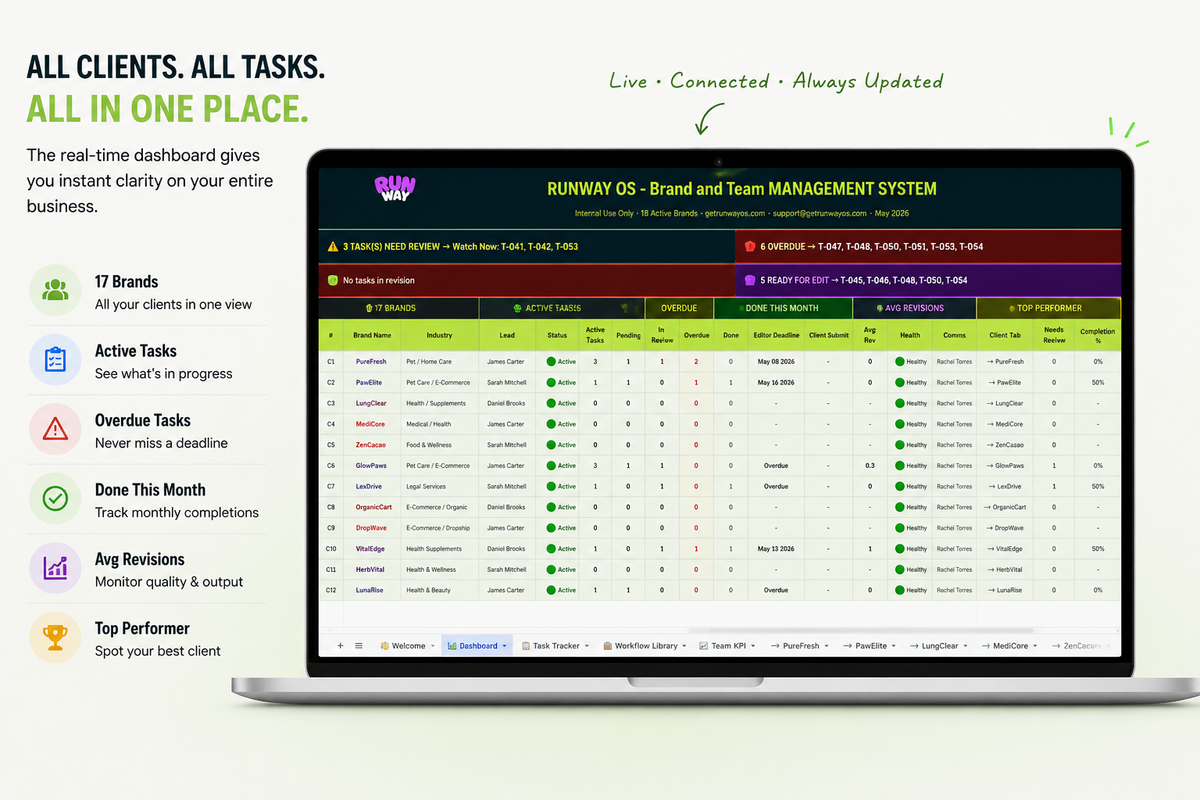
Your whole operation, one screen
Open Runway OS on Monday morning and know exactly where everything stands. Every brand, every video, every member - one screen. No digging through Slack. No opening 6 tabs. Just clarity.
What makes it special?
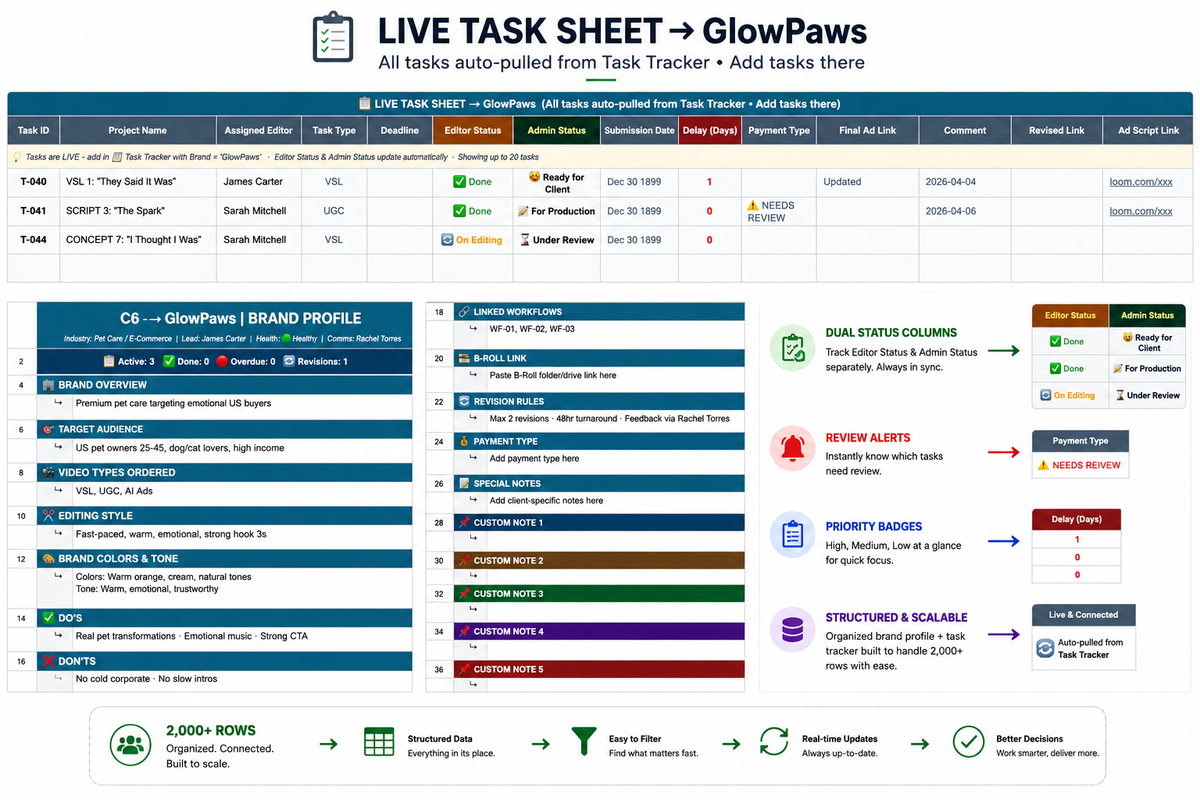
Every task assigned, tracked, and done
Every task lives here. Assign it, set a deadline, pick an editor - the Dashboard updates automatically. Your team knows what to do. You know it's getting done. No follow-up calls needed.
What makes it special?
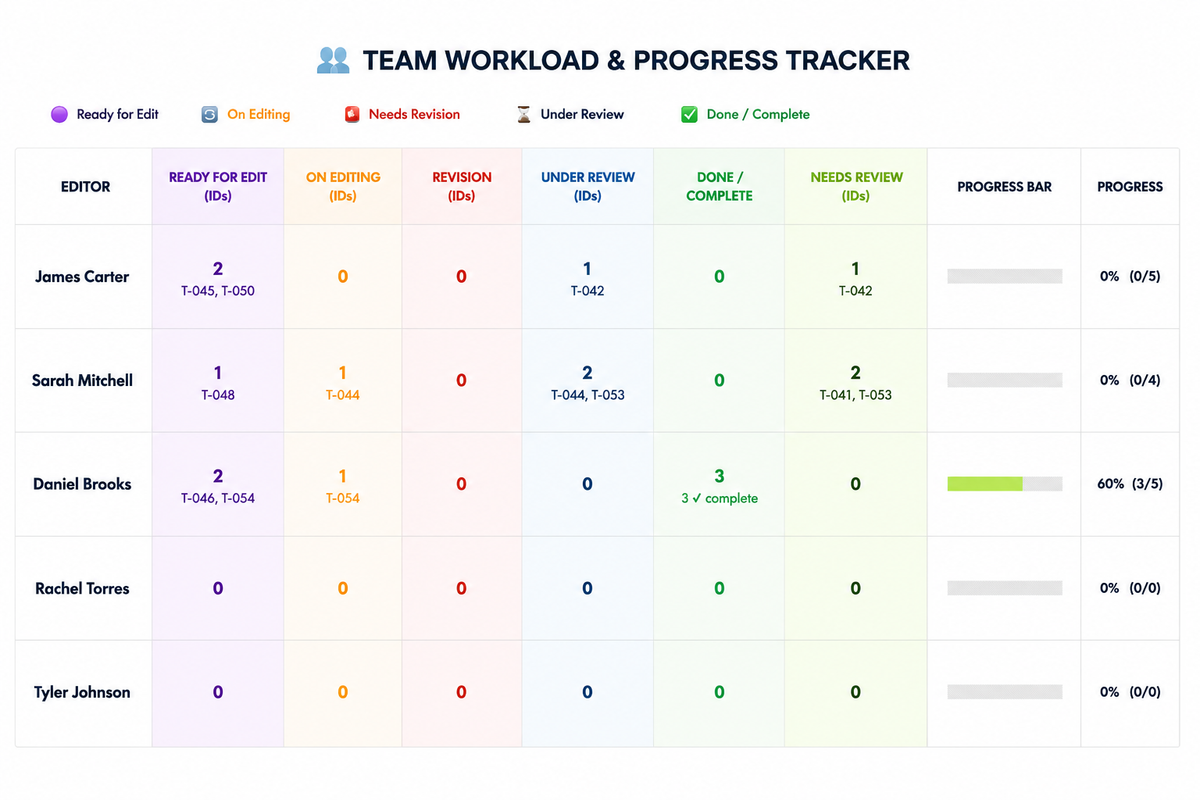
See who's overloaded before it's too late
See exactly who on your team is overloaded, who has capacity, and who's delivering. Before a deadline gets missed not after. This tab alone changes how you manage people.
What makes it special?
Running for your team in under an hour
Upload to Google Drive, rename the brand tabs, add your editors. Done in under an hour. No training sessions, no onboarding calls, no learning curve. Your team picks it up and runs.
Built For You If You Create, Manage, or Sell
Runway OS was built for video teams - but it works for anyone who manages clients, projects, and a team from one place.
Video Agencies & Production Companies
Running a team across multiple client projects. You need everyone looking at the same pipeline, same deadlines, same status - without chasing updates every morning. Runway OS is built exactly for this.
Freelance Video Editors Scaling Up
You've outgrown managing clients in your head. Get the system to handle more clients, deliver faster, and look more professional doing it.
UGC Agencies & Creators
Managing brand deals, creator rosters, deliverable deadlines, and payments. One dashboard. Nothing slips through the cracks.
E-commerce Brand Owners
Managing video ads, content production, and creative teams for your store. Track every asset from brief to live.
Ad Production Agencies
From brief to final delivery - every project stage tracked, every team member assigned, every client status visible in one place.
Social Media Agencies
Running content for multiple clients solo or with a small team. Agency-level organization without agency-level overhead.
Content Creators Managing Clients
You create the content and run the business. Keep your client work, deadlines, and revenue organized so you can focus on creating.
Video Agencies & Teams
Running multiple client projects with a team. Runway OS gives everyone one place to see what's happening - no more morning check-ins just to know who's doing what.
And honestly? If you track clients, manage projects, and want your whole team looking at the same information - it was built for you.
What's the difference?

🖥️ SYSTEM 1 - THE COMMAND CENTER
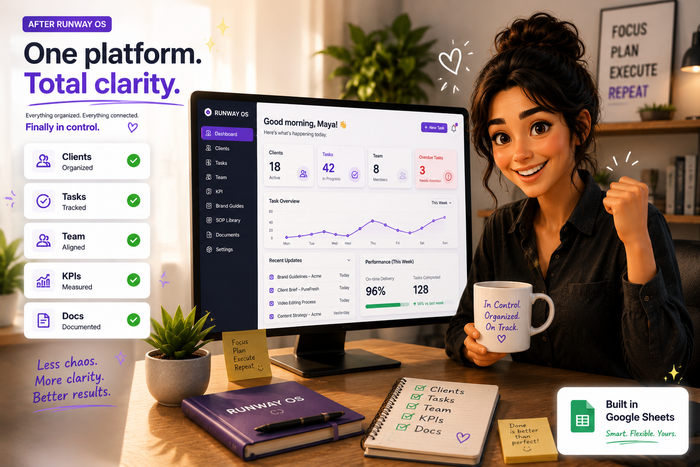
Every morning, open one tab and instantly know:
→ How many tasks are active, overdue, and completed this week
→ Which team member has capacity and who's maxed out
→ How each client is performing against their deliverables
→ Whether your operation is on track or needs attention
The Dashboard pulls live data from every other tab automatically. You change nothing here - it updates itself.
💡 Replaces: Manually counting tasks in Trello, pulling reports from 3 tools, chasing your team for morning updates.

⚡ SYSTEM 2 - THE ENGINE
Download and experience the change for yourself!
Task Tracker (2,000 rows)
Every task your team does - for every client - lives here. Assign it, set a deadline, mark a priority, and watch your Dashboard update in real time.
🎯 Every task is linked to a client by name - no ambiguity
🔴 High / 🟡 Medium / 🟢 Low
priority with automatic color coding - overdue tasks are impossible to miss 👁️
Dual-status columns: Editor Status (team side) + Admin Status (your side) - tracked independently
⚙️ Built-in automation: when an team member marks a task Done, you get flagged automatically - no chasing, no check-in messages 🔎 Filter by client, by priority, by team member - instantly
💡 Replaces: Asana, Monday, ClickUp - or the chaos of no system at all.

🏷️ SYSTEM 3 - THE CLIENT VAULT
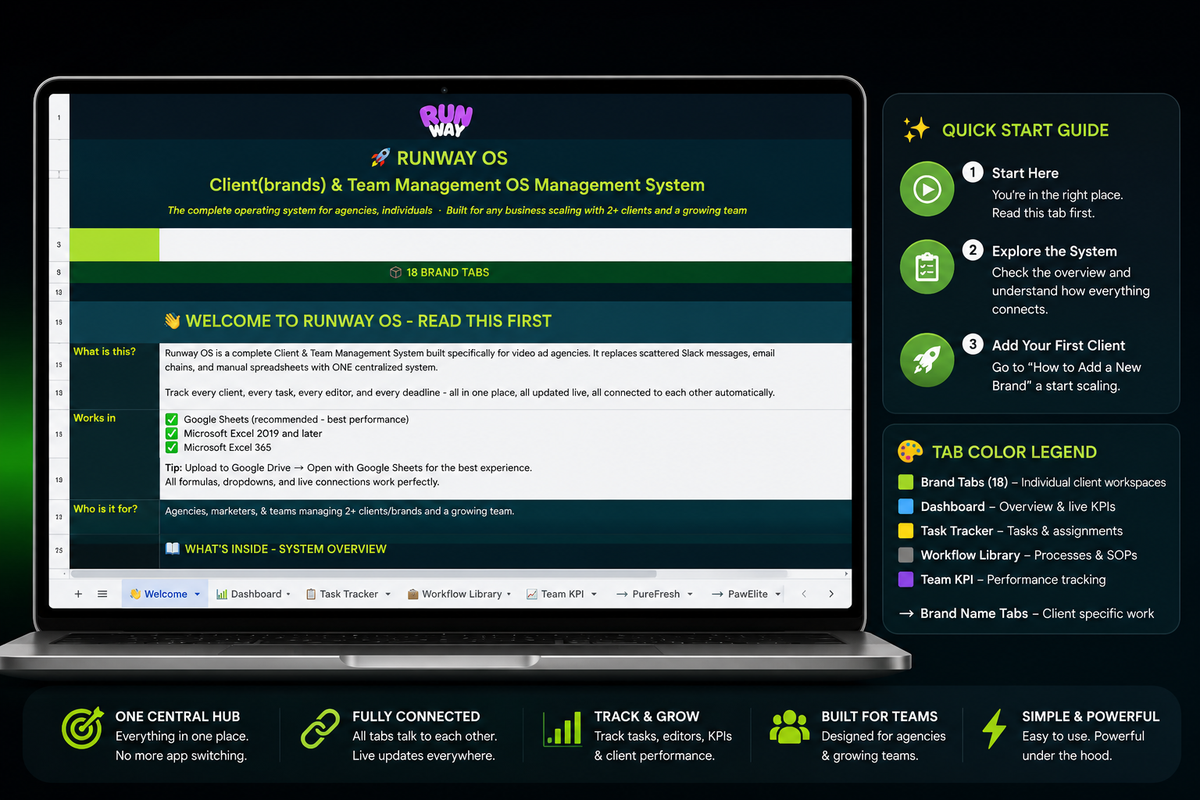
18 Brand Tabs (one per client)
Every client or brands gets their own dedicated tab. Inside:
→ Brand brief: product, audience, messaging, tone, formats
→ Client-specific task view - pulled automatically from the Task Tracker
→ Deliverable log - what was promised, what was delivered
→ Notes and context that don't belong in a task system
When a new client joins → fill their Brand Tab. When you need to brief a team member → send them to that tab.
💡 Replaces: Client folders in Google Drive, briefing docs in Notion, memory.

📈 SYSTEM 4 - THE PERFORMANCE LAYER
Team KPI Tab
You can't improve what you don't measure.
📊 Tasks completed per team member, per week
⏱️ On-time delivery rate
⚠️ Overdue task count per person
🏆 Performance scoring - reviews are data-backed, not gut-feel
The data flows in from the Task Tracker automatically.
You don't log anything manually.
💡 Replaces: Guessing who's performing, awkward review conversations with no data.

🔁 SYSTEM 5 - THE PROCESS LIBRARY
Workflow Library Tab
Stop rebuilding your SOPs every time a new project type comes in.
📋 Pre-built workflow templates for common deliverable types
🔢 Step-by-step task sequences you can copy directly into the Task Tracker
✏️ Fully editable - add your own processes as you build them
💡 Replaces: Writing the same task list from scratch for every new client project.

🚀 SYSTEM 6 - THE ONBOARDING LAYER
Add New Editor(Brand) + Add New Brand Guides
Built directly into the file - no external doc needed.
Everything is documented.
💡 No more "how does this work?" messages from new team members.

Frequently Asked Questions
Everything you need to know before you buy.
You get a fully built Google Sheets system with a live Dashboard, Task Tracker, Workflow Library, Team KPI view, and 18 pre-built brand tabs. Everything is connected - assign a task and the Dashboard updates automatically. No setup required. Open it and it's ready.
No. All formulas, dropdowns, and connections are already built. If you can type in a cell, you can run Runway OS. Most buyers have their full team operating inside it within an hour of downloading.
You get instant access to a Google Sheets template. After purchase you'll receive a download link — open it, make a copy to your Google Drive, and you're ready to go in minutes.
Yes - fully. Every tab, label, colour, and formula is editable. Most buyers customize it in under 30 minutes and have it running for their team the same day.
Due to the digital nature of Runway OS products, all sales are final and non-refundable. However, every purchase includes access to our support resources, setup documentation, and business-day email support. If you need help setting up or using Runway OS, simply reach out and we'll be happy to assist.
Unlimited. The sheet is built to scale -whether you have 2 clients or 500, the system handles it. You can duplicate tabs to create separate workspaces for different teams or projects.
Yes, and now is the best time to set it up. If you plan to hire your first editor or VA, having your system built before they start means you're not rebuilding everything while managing a new team member. Solo buyers also use it to track their own workload across multiple brands and clients.
The template comes with 18 pre-built brand tabs. Need more? Duplicate any tab and the Dashboard and Task Tracker update automatically. There is no hard limit.
No. One-time payment. You own it permanently. No monthly fees, no per-seat charges, no renewal reminders. Pay once, use forever.
Yes. When we release a new version of Runway OS, existing customers receive the updated file at no extra charge. Your one-time payment covers all future updates.
Stop winging it. Start running a real system.
No setup calls. No onboarding. No monthly fees.
Instant Google Sheets download · Works in Excel · 30-day money-back guarantee
